
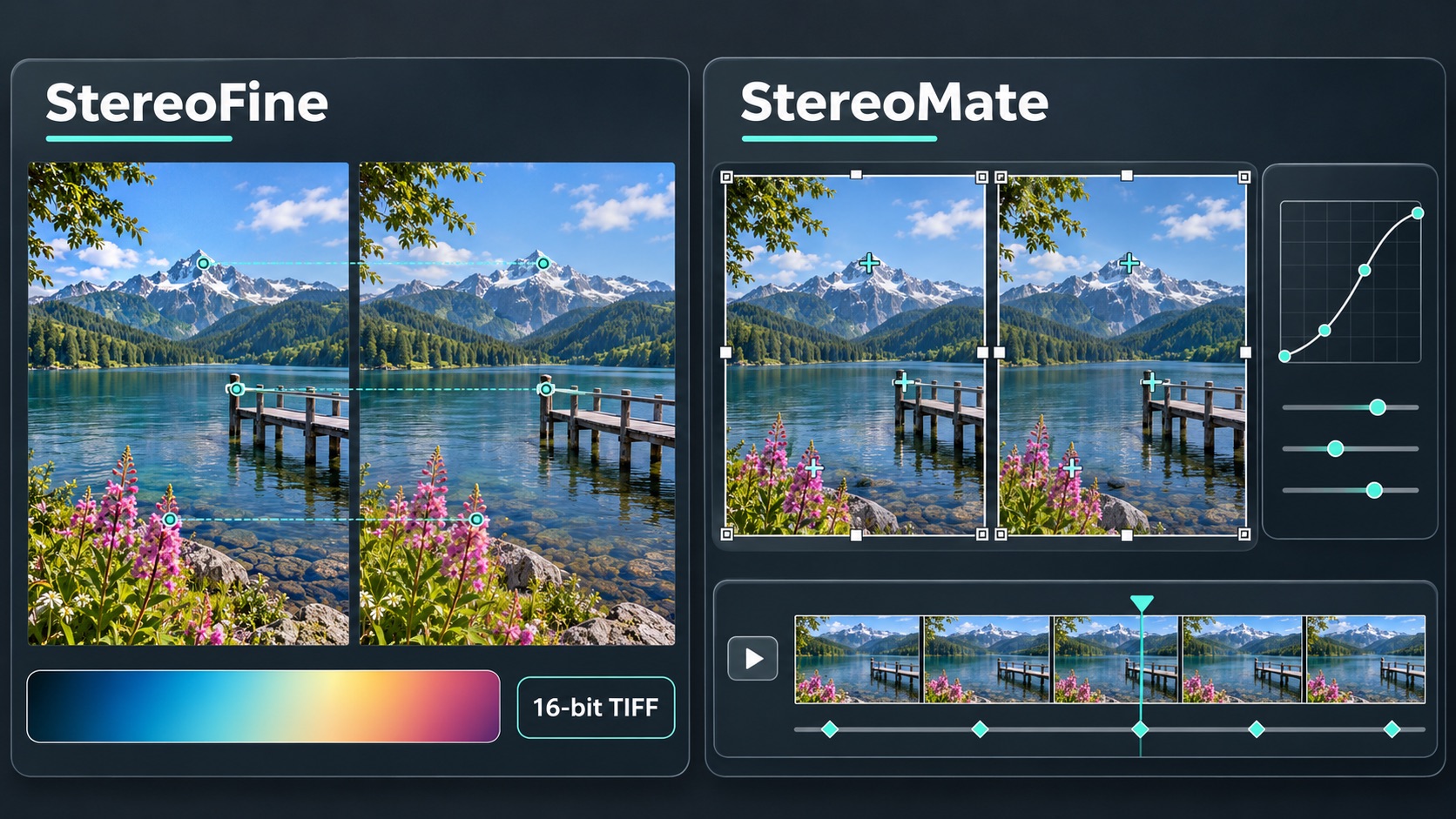
Two community-developed, open-source tools offer fresh ways to align, edit and share stereoscopic images—from StereoFine’s 16-bit colour workflow to StereoMate’s extensive photo and video editing features.
Both are free, MIT-licensed and process images locally. Their strengths, however, point toward different workflows. StereoFine puts particular emphasis on photographic output, reproducible adjustments and measurement uncertainty. StereoMate offers a broader editing environment that extends from still photographs to video, compositions and presentations. StereoFine documentation, StereoMate documentation.
StereoFine: a precision-focused photographic workflow
StereoFine automatically aligns stereo photographs, measures their disparity, adjusts the stereo window and exports the finished pair. Its processing pipeline takes a conservative approach: more complex geometric corrections are accepted only when they improve on simpler models using independent validation points. Selected transformations are combined so that each eye is resampled just once, reducing the image degradation that successive transformations can introduce. Alignment documentation.

The standout addition in version 1.2 is losslessly compressed SBS TIFF export with support for 16 bits per colour channel. The program retains 16-bit source precision through to TIFF output, while 8-bit sources remain 8-bit; mixed-depth pairs are promoted to 16-bit processing. TIFF exports also retain the common working ICC profile. This gives photographers more room for subsequent tonal and colour adjustments than an 8-bit JPEG workflow. Promoting an 8-bit image does not recover missing tonal information, but preserving genuine 16-bit sources avoids discarding it prematurely. StereoFine 1.2 output specifications.
“Lossless” here describes the TIFF compression: alignment, resampling, cropping and enabled colour adjustments still change the image.
StereoFine also accepts JPEG and JPS, PNG and PNS, TIFF, static WebP, BMP, MPO and separate left/right pairs, as well as full side-by-side images in supported containers. Particularly useful for newer capture workflows is its support for SDR HEIC/HEIF, including compatible tagged stereo images and Spatial Photos.
This support has clear limits: HEIC support currently follows an SDR, 8-bit import workflow. PQ- and HLG-encoded HDR images are explicitly rejected, while HDR gain-map reconstruction is outside the implemented feature set. Some SDR colour encodings without an ICC profile also require conversion before import. HEIC compatibility therefore does not imply preservation of HDR or high-bit-depth colour. Future support has not been announced. Supported formats and limitations.
We hope the developer takes this further: full HDR HEIC support could be a game-changer, specially considering almost all pictures taken with iPhone & Samsung in HEIC format are HDR, unlocking StereoFine’s potential to produce stunning HDR stereo images through losslessly compressed TIFF—or, with a future spatial HEIC export option, photographs ready to enjoy on Apple Vision Pro, AndroidXR, Pico 4 Ultra, and other compatible headsets.
StereoFine also provides symmetric colour matching, floating-window masks, batch processing and a native 100% inspection view. Per-image adjustments are stored in small .sfin sidecar files, allowing users to revisit their work and reuse reviewed settings in later exports. StereoFine 1.2 release.
Another strength is its treatment of uncertain depth measurements. The application explicitly flags estimates it cannot confidently confirm. Its published validation notes acknowledge that finding plausible near and far points does not prove that every surface in a scene has been measured. That is a useful distinction when foreground details or difficult image regions could escape automatic analysis. Measurement validation.
StereoMate: more ways to edit, view and present
StereoMate takes a wider approach. Alongside automatic alignment, it offers manual correspondence points with magnification and subpixel matching, lens barrel-distortion correction, detailed geometric adjustments and the ability to apply settings across a series. These controls provide additional ways to handle pairs that need intervention after automatic alignment. StereoMate features.

Its finishing tools are broader too. Automatic brightness and colour matching are accompanied by manual levels, contrast, saturation, temperature and tint adjustments. Users can crop directly on the image, adjust floating windows and inspect the pair through several viewing modes, including Dubois anaglyphs, parallel and crossed SBS, difference and alternating-eye views.
StereoMate also marks the nearest and farthest points, together with the point of greatest vertical mismatch. These overlays make it easier to connect numerical warnings with visible features. A separate output window can follow adjustments on a second monitor, projector or 3D television. Version V0.218 adds interleaved and checkerboard views to the main window. StereoMate documentation, V0.218 release.
The largest difference appears beyond individual photographs. StereoMate supports stereo video with keyframe adjustments, synchronisation of separate camera recordings by sound or motion, time-lapses, multi-image compositions and slideshows with movement, transitions, music and narration. It can also derive stereo views from suitably captured sideways-moving mono video using a time offset. These features make it relevant to users assembling a complete 3D presentation. Video and presentation capabilities.
Different strengths, shared value
StereoMate offers the wider range of stereo output layouts, including MPO, separate-eye JPEGs, full and half SBS, over-under and interlaced images. StereoFine’s distinctive output advantage is its documented TIFF workflow with 8/16-bit preservation; an equivalent high-bit-depth export is not documented in StereoMate’s current feature list. StereoMate export options, StereoFine export options.

Platform support differs as well. StereoFine supplies Windows, Linux and native macOS builds for Intel and Apple Silicon, although its documentation identifies Windows as the reference platform and calls for further real-desktop checks on macOS and Linux. StereoMate supplies Windows and Linux applications plus a locally processing browser version for desktop Chrome and Edge. StereoFine platforms, StereoMate platforms.
Neither feature lists nor version numbers establish which program aligns a difficult pair more accurately. That requires testing both against the same photographs. For now, their complementary strengths are clear: StereoFine deserves attention for preserving photographic precision and documenting measurement limits, while StereoMate stands out for its editing controls, viewing options and multimedia possibilities.
Together, they give the 3D community more choice—and demonstrate the practical results of the development work carried out over recent months.
StereoFine and StereoMate are just two examples of the wave of community-led 3D development that has gathered momentum in recent months. There is much more to explore, and this series will follow the tools and ideas making stereoscopic creation and viewing more accessible, capable and exciting. In fact, our earlier articles on Oku3D and SyLC could be considered Part 0 of The Power of the 3D Community: the first chapters in a story that is growing rapidly.